
G2 reviewers repeatedly praised the visual pipeline, ease of use, open fields, email-to-deal workflow, and integrations.
Pipedrive is a clear pipeline.
SoftSync gives you the wider customer journey.
Pipedrive centres a list of deals moving toward a close. SoftSync starts with that sales motion, then gives the team custom records and connected context for the work around the deal.
Side-by-side
SoftSync vs Pipedrive
Pipedrive is excellent at making the deal pipeline visible. SoftSync starts with that sales motion, then gives the team somewhere to keep the other things that make a customer relationship real: custom records, meetings, context, and the work after the deal.
Feature scope checked against Pipedrive product overview and Pipedrive plan features.
| What matters | SoftSync | Pipedrive |
|---|---|---|
| CRM model | Track deals plus custom record types such as renewals, jobs, services, or partners, with fields and linked records for each. | Deal-led CRM with familiar pipeline stages, standard record types, custom fields, and contact timelines. |
| Views and workflow | Use table, board, and calendar views in groups designed around the way the team works. | Strong visual pipeline, activity management, scheduler, automations, and forecast reports for moving opportunities forward. |
| Keeping context current | Bring email and meeting context into the customer record, then let Autopilot remind the right owner about repeatable follow-up. | Full email sync, tracking, automation, nurturing, and 500+ app connections for teams primarily managing pipeline activity. |
| Best fit | Businesses whose sales process includes more than one kind of record or needs a shared customer history beyond the pipeline. | Teams that mainly want a familiar pipeline and sales activity system. |
Choose the record model
your business actually needs.
Pipedrive is organised around deals, people, organisations, leads, products, activities, and projects on the relevant plan. SoftSync lets a team add record types for the work around a deal, such as renewals, jobs, equipment, shipments, or invoices, and connect those records to the customer journey.
Pipedrive has a home for these
A plumbing company6 tracked
- customers
- contacts
- deals
- jobs
- equipment
- invoices
and room for these
A wholesaler6 tracked
- customers
- contacts
- deals
- orders
- shipments
- invoices
A property manager6 tracked
- customers
- contacts
- deals
- units
- leases
- invoices
An agency6 tracked
- clients
- contacts
- deals
- retainers
- deliverables
- invoices
Many businesses manage more than deals: a job can return next year, an invoice has its own status, and a unit can have its own tenant or owner. SoftSync lets the team create record types for those items and give each one the fields, views, and relationships that make sense on the published plans.
Pipedrive's entity types, from their developer documentation, read 10 September 2026.
Shape the fields
that make the process useful.
Custom fields can adapt a deal or contact to a process, and Pipedrive documents different field controls by plan. The comparison is about the level of structure you need: custom fields within a familiar pipeline, or custom record types with their own views and relationships.
- Required fields, which block saving until the key data is filled in. Premium
- Formula fields, which calculate a value automatically. Premium
- Read-only fields, which control who can edit what. Premium
- Pipeline-specific fields, which show a field only where it applies. Premium
- Field descriptions, which tell your team what a field is for. Growth
Quoted from support.pipedrive.com, Custom fields, read 10 September 2026.
Compare the automation model
for repeatable follow-up.
Pipedrive documents automation allowances and offers additional automation packs on eligible plans. SoftSync does not use those packs; its plans describe product capacity and monthly usage separately, while Autopilot is designed for describing repeatable follow-up jobs and reviewing them before they run.
Automations
+50 at a time
Growth
Leads and deals
+25,000 at a time
Growth
Reports
+50 at a time
Growth
API tokens
+250,000 at a time
Growth
Teams
+10 at a time
Premium
Enrichment credits
+100 at a time
Premium
Prospector credits
+10 at a time
Premium
Custom visibility groups
+10 at a time
Premium
Custom permission sets
+10 at a time
Premium
From support.pipedrive.com, How does pricing work in Pipedrive, read 10 September 2026. Pipedrive publishes allowances and top-ups for several parts of the platform. SoftSync separates plan capacity from monthly usage: Pro and Business publish different usage levels, while Autopilot is designed for describing repeatable follow-up jobs and reviewing them before they run.
Keep repeatable follow-up
designed around the process.
Type chase unpaid invoices politely until they're paid, in plain English. Autopilot shows you the plan, you approve, and it runs with your laptop shut.
Have as many as your plan and workspace needs allow. SoftSync does not sell automation top-up packs, so you can design repeatable follow-up without managing a separate automation allowance.
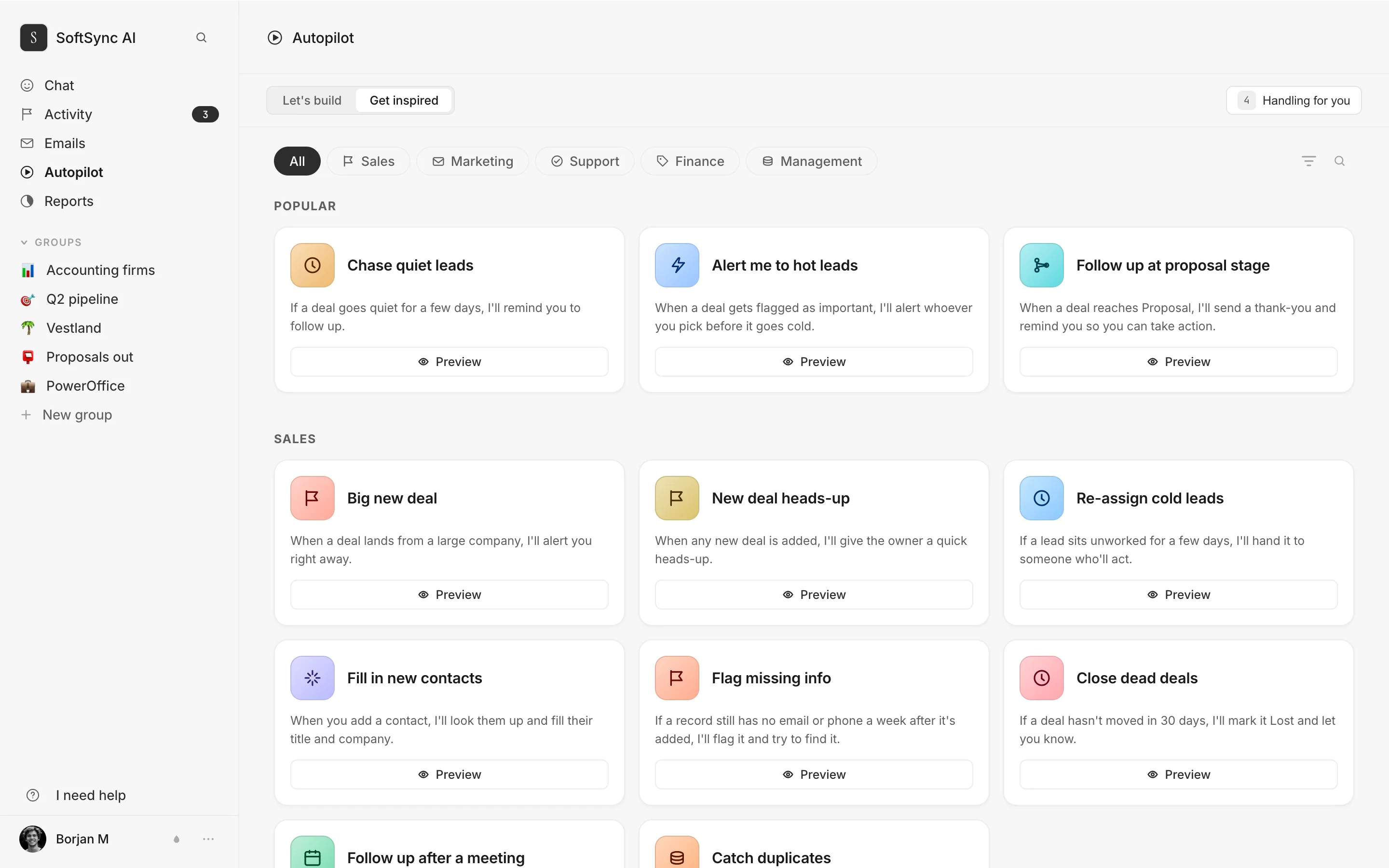
Connect the assistant
your team already uses.
Pipedrive offers an AI sales assistant for suggestions and summaries. SoftSync takes a connected-assistant route: connect Claude or ChatGPT and let the assistant work with CRM records directly, creating customers, moving deals, sending email, and cleaning up duplicates through the connected workspace.
Five people,
one year.
We're comparing Growth because it is the Pipedrive tier in this example with two-way email sync and workflow automation. Compare that pipeline workflow with the wider customer process your team wants to keep connected.
Pipedrive Growth
5 seats · 12 months
- Per seat, per monthBilled annually, from their own worked example.$39
- Five seats, twelve months$2,340
- CampaignsAn add-on on all four plans, Ultimate included.paid add-on
- Web VisitorsAlso an add-on on all four plans.paid add-on
- Projects, Smart Docs, LeadBoosterAdd-ons at this tier. Included from Premium.paid add-ons
- Automation capTop-ups sold in packs of fifty.yes
Year one$2,340 plus add-ons
Lite is $14 and uses a different feature scope, without the workflow automation and two-way email sync shown in this comparison. Pipedrive also documents that billing is per seat, so compare the team access and workflow scope you would actually purchase.
SoftSync Pro
5 seats · 12 months
- Per seat, per monthAnnual billing. $39 if you pay monthly.$29
- Five seats, twelve months$1,740
- Email campaignsincluded
- Add-onsThere are none to buy.$0
- Automation capnone
Year one$1,740
The published SoftSync plans share the product surface. Higher tiers add capacity, support, usage, and custom options rather than locking core CRM features behind separate hubs.
Pipedrive's per-seat figures are their own, from pipedrive.com's blog, which states plans run from the $14 Lite tier to the $79 Ultimate option per seat per month billed annually, and gives Growth at $39. Add-ons and the seat-charging rule are from support.pipedrive.com. All read 10 September 2026. Ours from softsync.ai/pricing. If a figure here is wrong, tell hello@softsync.ai and we will fix it and re-date it. pipedrive.com, plan prices · support.pipedrive.com, pricing and add-ons · softsync.ai/pricing
Why SoftSync wins beyond
the deal pipeline.
Pipedrive is built around the deal pipeline. SoftSync connects the full customer process around it: flexible record types, outreach, email, meetings, AI, and follow-up in one workspace.
- SoftSync carries the customer beyond prospecting. Pipedrive includes prospecting, web visitor identification, and a chatbot. SoftSync connects the customer record from first outreach through email, meetings, AI, and follow-up after the prospect becomes active.
- The pipeline is connected to every surrounding action. Pipedrive Lite at $14 centres a lightweight deal pipeline. SoftSync is designed for the broader customer process around outreach, email, meetings, flexible records, AI, and follow-up.
- Integrations work from the customer record. Pipedrive's marketplace has 500+ apps. SoftSync provides selected direct connectors and workflows, plus API and MCP access for custom connections, with the resulting activity kept in the customer workspace.
- Your team can shape the workspace around its process. Pipedrive has a large installed base and a familiar pipeline model. SoftSync is designed for teams that want to configure the workspace around their own process, with onboarding support when needed.
- The comparison is about workflow coverage, not review volume. Pipedrive has thousands of public reviews and a larger installed base. SoftSync gives the team a focused way to connect records, conversations, meetings, AI, and follow-up around the deal.
Buyer evidence about Pipedrive
The best and worst real feedback about Pipedrive
These are the clearest positive and critical signals from real Pipedrive reviews, and the reason to look at the whole sales workflow.
One G2 reviewer summarized the downside as: “Good design, terrible support.”
See the difference in practice
Bring one real sales workflow and see whether customer context, meetings, and follow-up stay connected.
Questions.
Isn't $14 just cheaper than you?
It is a different product. Pipedrive Lite is $14, while Growth at $39 is the first plan in this comparison with two-way email sync and workflow automation. SoftSync Pro is $29 and is designed around connected records, email, meetings, AI, and follow-up. Compare the plan that supports the complete workflow you need.
Can't I just use custom fields instead of a new record type?
Custom fields are useful when the information belongs to a deal or contact. A separate record type is useful when the item has its own lifecycle, such as a recurring job, an invoice with its own status, or a unit with its own tenant. Choose the structure that matches the work.
Can we move from Pipedrive to SoftSync?
Yes. Organizations, people, deals, activities and notes come across from an export. Automations, custom field layouts and add-on configuration don't.
Do you have a prospector?
Pipedrive's prospecting features are designed for finding new companies. SoftSync is designed for the connected work after a prospect becomes part of the process, including records, meetings, and follow-up. Choose the tool that matches the stage where your team needs the most support.
Pipedrive will have an MCP server eventually. Then what?
Compare what the assistant can do with the records and sales context. SoftSync exposes an MCP connection at https://api.softsync.ai/mcp/softsync, with documented actions for records, messages, notes, email, tables, groups, and views. The useful test is whether those actions match the workflow your team wants to extend.
What does Pipedrive cost?
From pipedrive.com, read 10 September 2026: four plans, Lite, Growth, Premium and Ultimate, running from $14 to $79 per seat per month billed annually in the US. Their own worked example puts Growth at $39 a seat. Add-ons and top-ups are on top of all of that.
Model the work
your business actually does.
Pipedrive centres deals moving through a familiar pipeline. SoftSync gives renewals, jobs, partners, invoices, and other record types a home alongside customer email, meetings, and follow-up.