
G2 reviewers praised Notion for keeping work in one place and adapting to the team's preferred structure instead of imposing a rigid system.
Notion is flexible.
SoftSync keeps your CRM current.
You can shape a Notion workspace around almost any process. For a sales team, the useful question is what happens after outreach begins: do email, campaign activity, meetings, customer context, and the next action stay connected without someone maintaining every entry? SoftSync is built around that connected sales journey.
Side-by-side
SoftSync vs Notion
Notion gives a team a flexible place for docs, projects, databases, and AI meeting notes. SoftSync starts with a CRM workspace and connects the sales journey from outreach and email through meetings, customer context, and follow-up.
Feature scope checked against Notion product features and Notion AI meeting notes.
| What matters | SoftSync | Notion |
|---|---|---|
| Starting point | A ready customer and sales workspace that you can still shape with custom records, fields, groups, and views. | A flexible documents-and-databases workspace that becomes a CRM through templates and team setup. |
| Keeping records current | Connect email, capture meetings on the desktop, and keep reviewed context with the appropriate record. | Docs, databases, forms, and AI meeting notes are strong; keeping a CRM database current depends on the team's process. |
| Automation and AI | Use AI Assistant for questions and updates, Autopilot for repeatable jobs, plus API and MCP for custom work. | Notion Agent, AI meeting notes, database autofill, formulas, and automations layered onto a general workspace. |
| Best fit | A team that wants the flexibility of a custom workspace with the daily capture and follow-up expected from a CRM. | Teams whose main need is docs, projects, and shared knowledge, with a lighter contact database alongside them. |
Customer context should
arrive with less manual work.
Notion's strength is the workspace your team chooses to create. SoftSync adds dedicated connections for the sales context that otherwise stays in email and calendars, so the team can spend less time copying updates into a record.
- CRM. zero mentions
- Email sync. zero mentions
- Two-way email. zero mentions
- Calendar sync. zero mentions
- Inbox. zero mentions
Counted from the readable text of notion.com/pricing on 10 September 2026, which runs to about 22,000 characters, so there is plenty there to count. Check it with a browser find. Notion positions itself as a connected workspace for notes, docs, projects, and databases rather than as a dedicated CRM. That distinction matters when a team decides whether customer history should be entered manually or connected to email, calendars, meetings, and follow-up.
As the sales process
grows beyond the template.
A flexible workspace is a strong beginning. As outreach, campaigns, meetings, and follow-up become a shared team process, compare which parts should be connected automatically and which parts your team wants to maintain by hand.
- Week oneyou
You build the first sales workspace.
Every contact you have, a deal board with the right colours, and a gallery view with company logos. The flexibility makes it easy to shape a workspace around the process you can see today.
- Week twoyou
You update it after every call.
The team can record the first conversations while the process is still small and familiar.
- Week fiveyou
The sales week gets busy.
As outreach and meetings fill the calendar, the team has to decide which updates should happen automatically and which need a person.
- Week nineyou
Somebody asks whether we ever sent that quote.
A quote or commitment is easiest to manage when the email, meeting context, and next action are visible from the customer record.
- Month fourthe team
A colleague adds a row with different columns filled in.
As more teammates add information, consistent records, matching, and follow-up become part of the system design.
- Month sevennobody
The team needs a clear next action.
The workspace needs to stay easy to find and useful at the moment a teammate is deciding what to do next.
The sales process needs its own connected system.
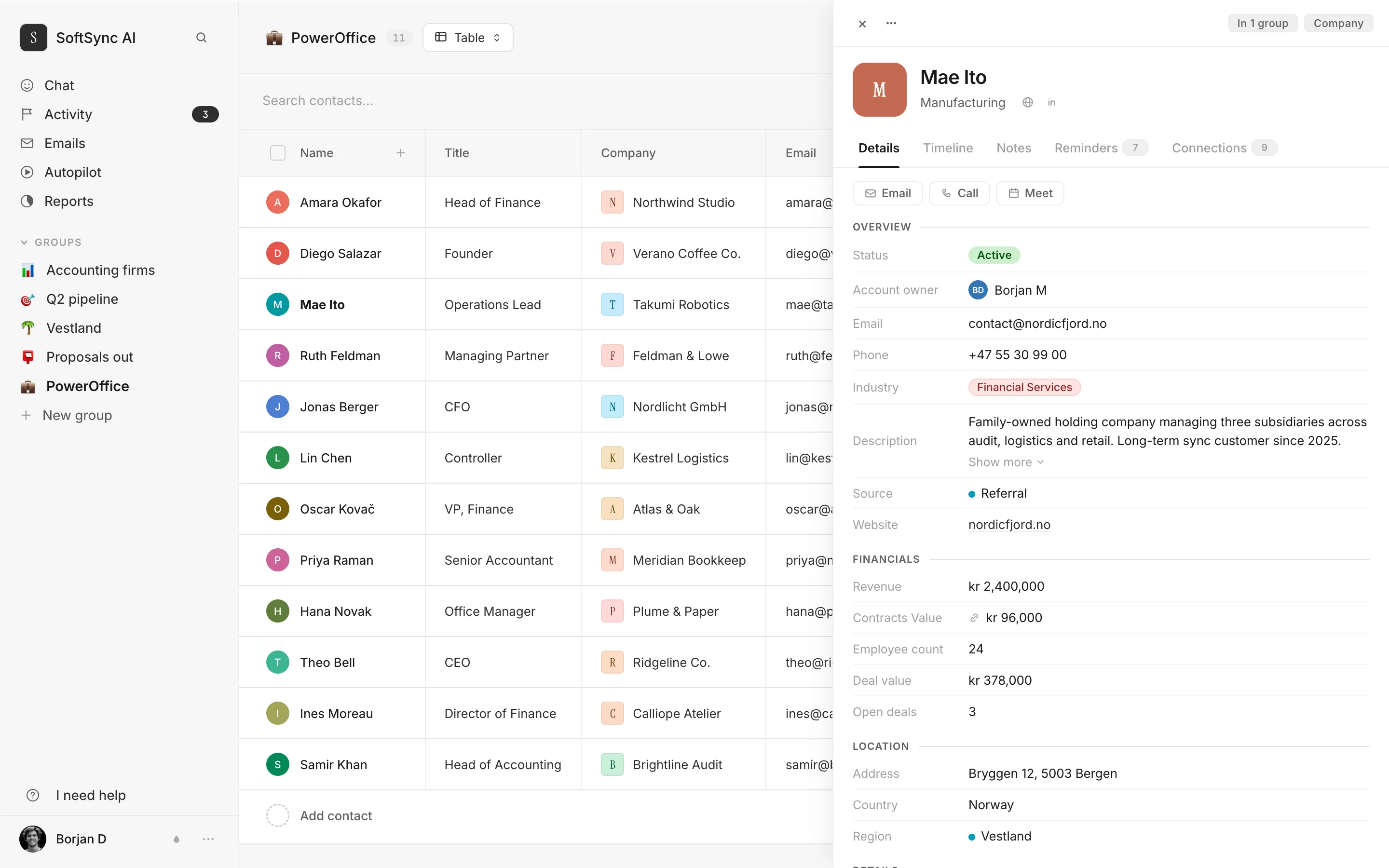
Notion is excellent at giving a team a flexible place to write and organise information. A customer record also changes through the week as emails arrive, meetings happen, and follow-up is agreed. SoftSync is designed to keep those events connected to the record.
This filled itself in.
Every email, meeting, note and invoice against the customer, in order, with nobody typing any of it after the call.
That's the whole difference. Gmail and Outlook both, calendar sync, duplicate checking, and company details from the register are part of the published SoftSync product.
The decisions to make
when a workspace becomes the sales system.
Notion is strong for documents, projects, and flexible databases. A sales system adds different requirements: reliable customer records, conversation history, meeting context, and follow-up that stays current as the team works.
- Relations and rollups. Notion relations and rollups are useful for connecting documents and databases. When a sales process adds customers, companies, deals, activities, and invoices, compare the data model and daily record workflow each system gives the team.
- Duplicates. A CRM workflow needs matching and merge rules so repeated customer records become one usable history. The right setup depends on how the team imports and maintains its database.
- Bulk email. A sales campaign needs sending, templates with merge fields, tracking, and unsubscribe handling. Notion's database can remain the planning layer; a connected CRM can hold the campaign activity beside the customer record.
- Turn dates into shared next actions. A date property can record a deadline. A sales workflow also needs ownership, context, and a clear next action that the team can see and update.
- Speed with real data in it. Performance depends on the database shape, relations, and the daily workflow. Load the same customer list into each product and compare how quickly the team can find a record, review its history, and update the next action.
Choose how AI
keeps the workspace current.
Notion offers AI agents and charges for Notion credits on top of the seat price. SoftSync connects the ChatGPT or Claude your team already uses so it can work with CRM records directly. Compare the assistant experience, credit model, and the sales context each system can act on.
And because turning an assistant loose on a customer list is how people get embarrassed, ours is handed these six written manuals first.
Quoted from notion.com/pricing, read 10 September 2026.
Why SoftSync wins when
customer work is the centre.
Notion is a flexible home for docs, projects, and knowledge. SoftSync is purpose-built for customer work: outreach, campaigns, meetings, and follow-up stay connected around the record that owns the relationship.
- Your wiki, your docs, your projects, your handbook. Notion provides process docs, project plans, meeting notes, and onboarding checklists. SoftSync provides the connected system for customer records, sales actions, outreach, meetings, and follow-up.
- A shared list of two hundred contacts that one person updates. A Notion database can hold a simple contact list. SoftSync connects a growing list to shared activity history, meeting context, and structured next actions from the start.
- You are pre-revenue and the CRM is still a lightweight planning list. SoftSync gives the process a connected home as soon as outreach, campaigns, meetings, and follow-up need to stay together.
- Your work is projects rather than customer relationships. Notion organises project-led work. SoftSync is designed for customer-led work where conversations, opportunities, and next actions need a shared home.
- You already pay for Notion and only need a database. Adding a database extends a docs workspace. SoftSync is a paid CRM for teams that want connected email, meeting context, AI, and repeatable follow-up alongside flexible records.
Buyer evidence about Notion
The best and worst real feedback about Notion
These are the clearest positive and critical signals from real Notion reviews, and the reason to look at the whole sales workflow.
A Trustpilot reviewer called the plan and account interface terrible, saying subscriptions were hard to track and cancel.
See the difference in practice
Bring one real sales workflow and see whether customer context, meetings, and follow-up stay connected.
Questions.
Our Notion CRM is actually working. Should we move?
Move when the sales process needs more than a maintained database. SoftSync connects outreach, email, meetings, customer history, and next actions in one sales workspace, so the team does not have to keep rebuilding the links around a Notion table.
Can't I connect email with an integration?
You can connect Notion to other tools, but every handoff adds setup and maintenance. SoftSync connects replies, meetings, and next actions to customer records through the workspace, with email, calendar context, meeting capture, AI, and follow-up already in the sales loop.
Isn't your product just a prettier Notion database?
SoftSync is a sales workspace, not a prettier database. It starts with customer records and connects Gmail and Outlook, calendar context, campaigns, meeting capture, duplicate checks, and company details so the workspace stays useful from first contact through follow-up.
Can we move our Notion CRM across?
Yes, and it's easy because it's already tabular. Export each database to CSV and import. Your page layouts and any docs stay in Notion, which is where they should be anyway.
Will a Notion CRM stay current automatically?
Notion databases store contacts; keeping a sales CRM current still depends on manual updates or automation. SoftSync connects email, calendar context, meetings, and follow-up to the customer record so the history stays useful without asking the team to maintain the database by hand.
What does Notion cost?
Their pricing page served us euro, and it carries its own note about FX rates, so these are their figures unconverted: Free €0, Plus €9.50 and Business €19.50 per member per month, with Enterprise on request. Read 10 September 2026. AI agents are metered on top at $10 per 1,000 monthly Notion credits, which is the one figure they quote in dollars. We publish in dollars at $29 a seat, and we don't convert theirs, because an exchange rate would make the number ours rather than theirs.
Give customer work
a connected home.
SoftSync gives customer work a connected home: flexible CRM structure plus email, meeting capture, AI, automation, and follow-up that stays current as the sales process moves.